


Please note that some of the links in my video descriptions are affiliate links where I earn from qualifying purchases. As an Amazon Associate I earn from qualifying purchases.
PocketFi 5G Intro
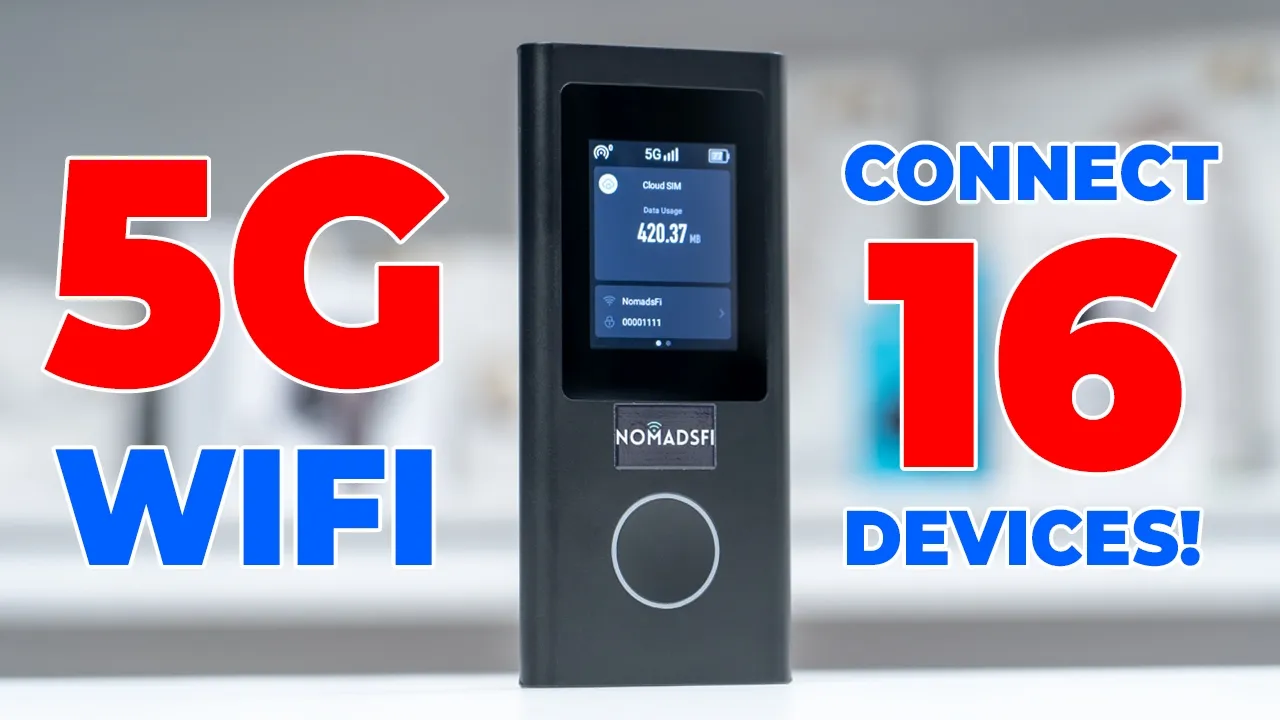
If you’ve ever experienced problems setting up a SIM card or an e SIM anytime you’re about to travel or if you work remotely, you have to check out the Nomads Fi Pocket 5 5G portable Wi-Fi hotspot device. You simply turn it on and all of your devices automatically connect to the portable Wi-Fi hotspot and you’re good to go. It has 4G and 5G speeds, dualband Wi-Fi, the ability to connect up to 16 devices at once. There’s also a 5,400 mAh battery for portable use, and it’s also very compact and lightweight for easy carrying. There’s also a convenient 2.4 in LCD screen to adjust the settings as well. But how well does it actually work if you want to stream Netflix if you’re uploading content or if you just want to do general browsing? Well, let’s take a closer look.
And a big thanks to Nomads 5 for sending this out for review. In
PocketFi 5G Package

the box, you get the Nomads 5 Pocket 5G portable Wi-Fi device, manual, USB type A to type-C charging cable. In terms of
PocketFi 5G Design

design, the Pocket 5G comes in at around 187 g, so not too heavy at all. And if I put that up against the iPhone 17 Pro Max, this is kind of a size comparison to show you kind of thickness and height. And you can kind of think of this just as carrying around a power bank. It’s that compact and small. We also have a 2.4 in LCD touchscreen, a button to just turn this on or turn it off. At the very bottom, we have the USB type-C port and a SIM card tray. And there’s nothing at the top or on the
PocketFi 5G WiFi Setup

back. To set up the device, press and hold on the power button until the device boots up [music] and connects to a network. Next, open up the Wi-Fi on your phone, tap on the hotspot Wi-Fi name, enter the password, and you’re connected and good to go. Let’s look at
PocketFi 5G Settings

the settings on the Pocket 5G. So, I’ll press the power button, swipe up to unlock, and I could see how much data I’ve used so far. I could tap into this. This is going to show the Wi-Fi name, Wi-Fi password, and if I wanted, you know, a different Wi-Fi name or a different password, I could go ahead tap into that and change it. You can also pick if you want to connect, you know, a to a 5 GHz or 2.4 GHz Wi-Fi network. You can also change the security type, and you can also hide the Wi-Fi. Now, at the very top left corner, this is showing how many devices are currently connected. So, my Samsung and iPhone are connected. It’s showing the current speed and signal strength and also the uh remaining battery life. Now, if we swipe over, we have this option for network optimization.
If you run into any issues, go ahead and press this button that we could take a look at the current connection. So, it’s showing um both of the devices that are connected. If I didn’t recognize one of these devices by the MAC address, I could just tap into that and just add it to the block list right there. So, they’re not, you know, kind of stealing my Wi-Fi. You can also go into the SIM card manager. Now, it’s currently set to cloud SIM, which means you don’t need to touch a SIM card. But if you were using a local SIM, you can actually switch to that if needed, and you can turn on or off the 5G network. We could tap into data usage protection, and this is going to disable certain known apps from doing automatic updates and downloads.
Now, you can also go ahead into lock screen, and this is where you can enable a lock screen, so no one can just, you know, kind of swipe up and change your settings. If we tap into more, this is where we can, you know, bind our account. We can also change the display brightness. We could change the language. These are the available languages right here. And we can also go under USB network. We can update the device. Or we can take a look at our IMEI information. So, how exactly
How Does It Work?

does the Nomads 5 Pocket 5G device work? Well, this doesn’t rely on a physical SIM card like you would have to insert into your phone if you’re traveling. What this does, whether you’re in the US or any other country, is it’s going to automatically pick the strongest network signal in the area you’re at and then connect to that. And it does that automatically in the cloud. It just kind of switches SIM profiles. Now, there is actually a SIM card slot at the bottom. If you really wanted to use a physical SIM, but this works so perfectly using the cloud SIM technology, it’s really
Device Setup

not needed. The setup is extremely simple. So once you get the Pocket 5 device, you just pick a monthly plan whether you’re going to be in the US or if you need it for international travel. And then you’re going to set up your Wi-Fi name and password right on the device. Then once you set your devices to join the device for the first time and you set the option to automatically join. Every time you turn this on, your phone, laptop, tablet, etc. will automatically connect. No issues at all. And that’s so convenient because some phones don’t actually allow you to share the Wi-Fi hotspot. But with this one device, you can connect up to 16 devices at once. So you can have your phone, a second phone, your laptop, tablet.
You can have your friends phones or their devices or your partner’s devices. You really have unlimited options with this.
Connection Speeds

In terms of speed, you can have up to 2.5 Gbits per second download and up to 500 megabits per second for upload. Of course, the speeds that you get are going to vary based on a bunch of factors such as the country you’re in, the strength of the network signal, even the carrier. It’s also going to depend on the network traffic. So certain times of the day it may be, you know, faster speeds, certain times it’ll be lower speeds. Now I’m in China right now and I tested this both indoors and outdoors on a 5G network, both on my S25 Ultra, my iPhone 17 Pro Max, and on my Windows laptop. And the highest speeds I was getting were about 205 megabits per second for download and about 53.5 megabits per second for upload, which is extremely fast.
So that was plenty fast to just look at YouTube videos in 4K quality. It’s good for general browsing, downloading files, and if you’re a content creator, that type of upload speed is extremely fast as well if you’re uploading to YouTube, Tik Tok, Instagram, and if you’re working remotely as well. I also tested my devices with the 4G connection. And I was getting around 90 megabits per second for download and up to 40 megabits per second for upload. Again, still plenty fast and quite usable for all of those activities. If you’re going to be gaming, my ping was between 70 to 80 milliseconds on average. So, not the best for fast-paced gaming, but for casual gaming and general use, you’re not going to have any issues at all.
Now, I did definitely experience lower speeds again based on network traffic during different times of the day. But on average, when connected to a 5G network, my download speed was around 80 megabits per second and upload was around 27 megabits per second. Still, those average speeds are plenty fast for general browsing, downloading files, streaming Netflix, and uploading content to, you know, YouTube, Tik Tok, Instagram, etc. Now, let’s look at the
PocketFi 5G Pricing

pricing. So, if you’re going to be using this in the US, they have a promo for 150 gigs for about 65 US a month. You also have the option to pick 50 gigs. There’s an unlimited light option. So, you have unlimited data. It’s going to be capped to 4G speeds. And there’s a 5G unlimited option as well. Now, if you’re going to be using this internationally, then prices start at [music] uh 39 US for 10 GB, and that’s in zone A, so it’s going to cover 70 countries. And you can scroll to see which countries that includes. There’s also zone B, 105 countries. And then if you want just global, all countries covered. Um, prices start at 69. And of course, you can switch how many gigabytes you actually need for whichever zone you’re
Recommended?

in. So, I highly recommend the Nomads 5 Pocket 5G portable Wi-Fi hotspot device. It’s extremely easy to use. Once you get it initially set up, you just turn it on, all of your devices automatically connected, and you’re good to go. And having the built-in battery is so handy. You don’t need to plug this into a wall like you would if you were carrying a Wi-Fi router around. And you just can recharge this with a power bank. Plug it into your laptop while you’re using it to recharge it as well. I also like the handy touchscreen. I don’t have to download an additional app to modify the settings. I can do it all on this one compact device. So, if you hate swapping SIMs or fiddling around with eSIM settings and network settings, the Pocket 55G is going to be your new best friend.
So, if you want to get your very own Pocket 55G, I’m going to leave links down below. And you can also use my discount code DCT for 20% off your order. And if you found this video helpful, maybe consider checking out this video next and maybe liking and subscribing as well. I review a bunch of different tech and I have way more cool reviews coming up next. Hope to see you in the next one
Please note that some of the links in my video descriptions are affiliate links where I earn from qualifying purchases. As an Amazon Associate I earn from qualifying purchases.

