


☑️ Get the Galaxy Z Fold 4 on Amazon
Please note that some of the links in my video descriptions are affiliate links where I earn from qualifying purchases. As an Amazon Associate I earn from qualifying purchases.
Intro

hey it’s adrian today i’m going to be doing a full review of the samsung galaxy z fold 4. now if this is going to be your first foldable device this review is going to help you determine if this is the right phone for you if you already own the s22 ultra like i do i’m going to compare the z-fold 4 to the s-22 i’ll trade a couple of areas and you can decide if it’s worth replacing your s22 ultra with the z-fold 4. so let’s get started if you’re coming from the s22 ultra you may notice the
Design

weight increase just for a week or two i’ve gotten used to the weight increase on the z-fold four so the s22 ultra comes in at 229 grams or half a pound and the z4 comes in at 263 grams or 0.58 pounds if we take a look at a top view of both phones so when you measure the width across the hinge it’s about double the thickness of the s22 ultra from the top now taking a look at speakers the z-fold 4 has a set of speakers and it’s a pretty wide grille here on the ultra you have a speaker right at the top here and if you look at the bottom of both phones you can see the speaker grille is the same wide as it is on the top but on the s22 ultra it’s about half the width so the sound is much fuller much much more powerful coming from the z fold for looking at the back of both phones so you can see that there is something missing so while the cameras on the z4 are quite capable if you do like to take you know those extra zoomed in shots you don’t have a 230 millimeter telephoto lens like you do on s22 ultra when it comes to overall ergonomics the s22 ultra you can see if you look at the edges um they’re a bit more sharp so when you’ve been using the phone for a long time you know you do notice that it’s pressing into your skin like you can see in the corner here now when you look at the fold four pretty much every part of this phone is curved so it’s not something that you really notice so here’s some quick specs
Specs

for those of you who are interested feel free to pause it and review but basically you have gorilla glass invictus plus front and back it is an amulet screen at 120 hertz hdr 10 plus and 1200 nits of peak brightness the ppi on the inside screen is 374 and on the outside screen it’s 402 ppi this phone has snapdragon 8 plus gen 1 [[CORRECTION: S22 Ultra has 8 Gen 1 NOT 8+ Gen 1]] while this phone does have an ipx8 rating which allows it to be in up to 1.5 meters or about 5 feet of water from up to 30 minutes there is no official dust rating It has 25 watts of fast charging [[CORRECTION: S22 Ultra has 45 W]] but i’ve not been able to achieve that and i’ll show that later in the video so the biggest draw of the z-fold four the biggest advantage
Cover Screen

obviously is having easy access to such a large screen to get a lot done and i didn’t think that i was going to be using the cover display all that much because you know why would you when you have such a large screen but i’ve actually found myself using this quite a lot because i’m able to get a lot done and it’s only when i want like an immersive experience in terms of watching videos um taking photos and i want to get framing right or like gaming that i ever need to go into that inside panel now i also mentioned that this is a two-handed operation so you know you have to be a bit intentional you know when you’re going to be using it on the inside panel but a lot of the times you know i’m able to get what i need to get done day to day you know in terms of texting replying to the occasional email uh you know reading the news you know it’s easy for me to just go in and the text is you know sufficiently large enough that it’s not a problem for me now the only area where i would say you know it could be an issue to some is let’s say i go into search here and i need to type or text so you know depending on how big your fingers are this could be a bit cramped it could be a bit tight for you but what i’ve done is so you can see i’m going to just try texting you know how are you and you know i didn’t hit that exactly over there but what i found works really well on this smaller screen is i’ll just do the swipe gestures to type and that works really well and i can easily span all the way from the end of the keyboard to the other side one-handed and that works really well the inner display really does let you multitask to you know
Inner Screen

whatever type of workflow pattern that you have so sometimes you know i’m on a website and i’m you know looking up information but then i may also be on another uh window or tab chatting to someone while i’m referencing information and you know i can easily do that by just you know having a second browser window open and you know i can have chat going in here and you know referencing material on the other side of the screen or i could be you know just chatting or instant messaging someone so you really have a lot of functionality in terms of the main screen and there’s a lot of experimental features as well so that you know you could have floating windows and you know maybe up to four windows transparencies and things like that one really cool thing that i found and it’s kind of like an experimental feature is that while i have the menu open here say i was chatting with someone to you know figure out dinner plans i can press and hold the instagram icon and of course drag it there or drag it here if i drag it here you know i’m splitting the screen obviously i can kind of you know narrow it down a little bit more but what if i want most of the screen here and i just want the chat box to be you know much smaller well the way to do that is like this i can open instagram and then from the top here i can drag down and i can have a very small window and then i can just move that wherever i want on the page in addition to that i can go ahead and i can click this option here click here and then i can change the opacity so it’s not very bright or you know it’s not taking up much of the screen and i can still see what’s going on under there so this can be kind of helpful if you have like a website open you’re looking at sports scores stocks or things like that and of course if you want you can just go back into the regular flip screen now you do have some other options here so when you do size it down you see you can just put it in the corner there as a shortcut and then just tap it to bring it back so you know whenever your phone dings right so to enable that feature what you’re going to do is you’re going to go to settings up here and in search you’re just going to type in labs when that comes up you’re going to click on labs under advanced features and you can see there’s an option here for labs click on that and go ahead and enable this option it says swipe up for pop-up view so you can see it showing exactly what i was doing where i could swipe down and resize now the other option you’re going to want to do is multi-window for all apps and that says allow all apps to open in pop-up view or split screen including apps that haven’t been designed for these layouts so you can kind of force it you know an app that wasn’t programmed for that to behave in that way so this phone does have what samsung calls flex mode and you can see right now the panel is completely open and i have videos on the side here that i could watch but if i fold it you can see those videos automatically shifted down to the bottom if i unfold it then they come back up so i think the number of apps that support this are quite limited obviously this is samsung’s tv plus app and it is supported here another thing that i want to point out in terms of screen options is you can see on the cover screen there’s no call of duty or gentian impact on this front screen but if i go ahead and open up the main screen those app icons are there so the phone does let you customize the cover screen and the inner screen to be completely different if you like so you could have the cover screen just for you know quick apps or quick app access and then the inside apps could be kind of your like full screen experiences if you want your cover screen to mimic exactly what’s on the inner display you would just go into your settings here go down to home screen and you can see the first option there says cover screen mirroring now if i turn that on and hit apply you’ll see that when i go back to the home screen here and i go to the cover screen they’re exactly the same so the call of duty and gentian impact icons are gone so it lets the cover screen take preference in terms of mirroring in bright sunlight you’ll have no problems because of the screen’s maximum brightness and it seems pretty on par with the s22 ultra if you’re a fan of having the always-on display like i am you can see that it’s much smaller on the z-fold four naturally it’s just a less wide screen but you also have the option say you always use this phone in this open display once you turn it off you also have the always on display on the inside there if you like here is an app that i sometimes use to get access to my laptop when i’m not at home so you can see this is the size of the display obviously i can you know kind of pinch to zoom in and take a look but it’s still you know a pretty small display and if i go to the fold you can see it’s a much more usable display and i can zoom in to you know see a little bit more information so that’s definitely a huge deal when it comes to remote access looking at instagram on both phones so you could see on the fold four i have black bars going down the right and left side and i can just move instagram to occupy whatever side that i want but i also have an additional option and when you’re under display and full screen apps i can scroll all the way down to instagram here and instead of 16×9 i can set it to 4×3 let’s just jump right back and using the handy taskbar at the bottom and you can see that now it’s occupying way more of the screen i still have a little bit of room to play here right and left and if i completely you know want to occupy the majority of the screen i’ll just go back here into full screen apps scroll down to instagram once again and set up the full screen to force it and now when i go into instagram you know it’s occupying the entire screen and from here you can see it’s still a pretty great experience and it’s easy for me to just you know zoom in take a quick look and uh continue on my way so you have a lot of flexibility in terms of how you want apps to behave on the z-fold for playing videos on youtube you can see you know this is a much better experience because i’m not full screen yet and i can see much more of the video than on the s22 ultra obviously i can just put this into full screen let’s just bring that down here and if i go to full screen on the z fold for you know which do you prefer right because of the aspect ratio here you know if you’re having these big black bars top and bottom however you can rotate the phone and let’s enable the landscape rotation there and you can see the black bars have reduced you know noticeably and it’s a bigger image that way using twitter you can see everything is really nicely spaced out and it’s a nice nice type of formatting going on tick tock you have videos in the middle and then you have options on the side so you know the video is pretty much the centerpiece and on reddit you know images and things like that are much more bigger and at the forefront so overall just using social media it’s a real joy to use with this phone if you’ve seen this
Screen Settings

part please skip ahead but for those of you who haven’t when you’re in the display options you can see whenever you click on one of these menus on the left side here you have a sub menu that pops out there so if you scroll into screen layout and zoom multi-view is that option and you can change how big you want everything to be i like it pretty small now if you go to standard view this is basically what you would expect to see on any type of android phone without you know a folding screen but to get back into that let’s just go to screen layout multi-view and change that zoom level to the bottom and that’s probably going to get you the most screen real estate for productivity while we’re still in display you also have an option to scroll down to full screen apps and all of my apps are set to full screen but you do have the option to change the aspect ratio to 16 by nine or four to three especially if you’re going to be using certain apps only on the cover screen you’ll also want to make sure that you scroll down and go to the taskbar and ensure that it’s on and show recent apps are on as well and what that’s going to do is whenever you’re in an app you can easily go to another app let’s say instagram and you can quickly switch between instagram and youtube like that now one workaround to that three screen layout is to do what i showed a bit earlier and kind of you know have a window open resize it down and move it somewhere else now this is a bit silly and overkill i can’t ever think why someone would need this but it is there if you want to do it imagine you’re watching something on your front cover so let’s open up youtube and i’m watching a video on youtube but i want to go ahead and fold the display so that i can lay the phone flat and watch something well the problem is is that you have to live in an area below 90 degrees because as soon as you turn or angle this front display to 90 degrees or more the inner display turns on and there is no setting that i could find to allow you to get to 90 degrees now luckily one of my viewers arash pointed out a really cool tip that i’m going to share with you today so to do the tip what you’re going to do is you’re going to open up the front screen launch into the camera app click on the selfie mode and it says take selfies with the rear camera so we’re just going to lift the screen up to 90 degrees exactly or more if we like and now that we’re in the selfie mode we’re going to exit out go into youtube and we now have the ability to angle this 90 or more and we can set the phone down perfectly flat and watch it at 90 degrees so thank you arash for sharing that tip
Geek Bench Score

looking at the geekbench results so the z-fold four did finish with us a few seconds before the s22 ultra single core for the z-fold four is 1318 compared to 1200 on the s22 ultra the multi-core score is 39.76 on the fold four compared to 3060 on the s92 ultra
Gaming Performance

so after two games the temperature still feels pretty uh pretty manageable it doesn’t feel too hot or too warm and if i take a temperature reading again still around 35 so after two games it’s doing quite well obviously two games is not a you know a big amount of games obviously if i was on here for you know many hours i expect it to get a bit warmer for just you know light casual gaming every once in a while it’s still quite manageable okay so after a little bit of light gaming on kenshin i can definitely feel it’s getting warmer at the back here if i do a reading you can see almost around the 40 degree or 40 celsius mark so about 5 degrees warmer than when i was playing call of duty okay so taking a look at the temperature after two games so 36 so it went up about one degree not too bad for two games at high settings okay so after playing a few minutes of gaming with kenshin i can feel it’s noticeably warmer at the back here so if i go around here you can see 39 40 41 kind of 44 so it’s definitely a bit warmer on the s22 ultra versus the z fold four even though i’ve played around the same amount of time or actually a little bit lower time and i was playing on full screen on the z4 fold so the gpu and cpu on here are getting taxed a little bit more at high settings than on the z volt 4.
and call of duty mobile so this is what the interface looks like on the s22 ultra and what it looks like on the z fold for with the larger screen now you can see i have a message here where it says the restart call of duty and this is coming up because i started the game on the cover screen but then i wanted to open the phone and have it show on the main screen and the game asks that you restart it on your preferred screen now there are some settings in the menu where you can kind of force it but i noticed that it’s kind of hit and miss and the aspect ratio is sometimes really messed up so it’s best to just close the game completely and just start it on the preferred screen when it came to gaming so both phones perform excellently but the z-fold four had the slight edge so when i ran the geekbench results you know single core and multiscore were higher on the fold four and maybe that doesn’t always translate you know real time or real world but when i did play gaming you know it felt a little bit smoother it didn’t get as warm as on the s22 ultra and of course having this much more screen space you know compared to what you see on there it makes it much more easier and enjoyable when you’re gaming so in
Camera Performance

terms of specs you have this three camera layout at the back so you have a 12 megapixel ultrawide a 50 megapixel wide angle and a 10 megapixel that’s capable of 3x optical to zoom now on the front you have another 10 megapixel camera and on the inner inside display you have a 4 megapixel camera in terms of camera performance so the fold 4 is boring the camera technology from the s22 ultra so performance for on both phones is you know really excellent however the s22 ultra does have an edge in my eyes because you have up to 10x optical zoom on here so you know those are really crisp clear images with an optical zoom on the z-fold four the maximum optical zoom you have is a 3x optical zoom and when i was taking photos you know i did find myself missing having that extra reach or you know that 230 millimeter equivalent of a zoom lens that the s22 ultra has and ultimately that’s really gonna you know be based on your needs you know do you find yourself using a telephoto zoom a lot or are you gonna be okay with a 3x in my eyes this is uh the s22 ultra is just a better all-around camera experience because you can go from ultra wide to you know telephoto where the default 4 has an advantage over the s22 when it comes to cameras is basically with the camera interface so you know having such a wide screen really opens up a bunch of options when it comes to taking photos so you can see on the left side here it says see your shots straight away and as i take a photo um you know it’s just auto populating here and i can kind of zoom in right here and delete a file if i don’t want it so you know that’s something that you would have to you know go into the gallery on s2 ultra click it zoom in delete it but you can do that really easily on the fold you also have the option to turn on the cover screen preview by tapping that icon there and what that allows you to do is that you can use the live display on the cover screen to see whatever the rear cameras are seeing so you can use these rear cameras for you know high resolution selfies um this can also come in handy if you want to do vlogging or live streaming because what you could do is if you want to show more of your environment you can you can switch to the ultra wide lens on here and you can see much more of the room and then you can go into telephoto if you want to do that the other thing uh or the other way this could be helpful is you know if you’re taking a photo of a group of people or even just one person you know everyone can see their framing you may not even need to tell them hey move right move left they can see that in real time here’s an example of some selfie photos that i took using the cover display camera the rear camera and the inside camera now i don’t recommend using the inside camera ever but here’s an example of what you can expect when it comes to battery life it’s a little bit challenging to say but i’ll give you my thoughts so on the s22 ultra i know when this phone first came out a lot of people kind of complained about the battery life and i made a video to address that however i easily get like a day of battery life out of this with my current
Battery Life

settings so i do run it normally with dark mode i just have it on light mode for this video and that combination of these things in the background dark mode and i normally have my brightness much lower um that you know comfortably lasts me a day for sure now when it comes to the z-fold 4 it’s a bit more challenging because it’s really going to depend on how often you use this front screen and how often you use this inner display so i do find myself using the front screen quite a lot just for you know general browsing and replying to quick text messages or checking my email and then when i need to write you know some kind of a longer message or anytime i want to watch video like youtube or amazon prime then i’ll go in and i’ll use this screen so it’s really gonna depend on what percentage of the time you’re using this screen or the cover screen because obviously it takes much more battery life to power this size of screen now in terms of what i normally have running so i usually have the brightness about halfway that’s usually adequate for me and i have wi-fi on all the time bluetooth location and dark mode now i do turn on mobile data when i go out but then i also turn off wi-fi since i’m not going to be using that and that’s getting me around six to eight hours you know general use some video very light gaming so that’s about what you can expect one thing that i want you to keep in mind is don’t be surprised if the battery performance is poor when you first get this phone you can see on my s22 ultra under battery it shows 82 and it shows that it’s in great status now the s92 ultra i’ve had it for a while and the phones learn my usage patterns and optimize the battery for that you can see on the fold for it still says learning usage patterns so during this period the phone is still learning how i’m using it then it’s going to optimize the battery life but keep in mind that when you first get a phone you spend a lot of time customizing it changing settings transferring files you know just to get it exactly how you want so the battery life is going to fluctuate a lot but once this message disappears learning usage patterns then you can be sure that you know the battery is going to be properly optimized for you while battery life has been excellent on this phone and i easily get a day of use there is one thing that i wanted to point out so if you look at point number 22 where it says typical value tested under third-party laboratory condition typical values the estimated average value considering deviation in battery capacity so it says the rated capacity is 4275 milliamp hours now in all the advertising it’s 4 400 but there is going to be some variance but at minimum you’re guaranteed a rated capacity of 4 275.
so there may be some variance in terms of your battery life and someone else’s just due to that so after charging the fold four for about 10 minutes we jumped 14 so we started at 80 and we finished at 94 percent and the wattage was around 13 to 14 continuously this phone’s rated for 25 watts of fast charging and i normally get between 13 and 14 watts whenever i’ve tried to charge it i am using a third-party charger but it is rated for 45 watts and i do get faster charging speeds on the s22 ultra so i know that charger is not effective if you’re getting faster charging speeds and i am using the official samsung charger please let me know here’s a quick sound test of the speakers on the fold 4 and s22 ultra and the fall 4 just has a fuller louder sound to me so here we go
Sound Test

so overall you can hear that the z-fold 4 has just a fuller sound and a louder sound and if you take a look at these speaker grilles you can see these are quite wide and you have them top and bottom since there is no under display fingerprint sensor you have to unlock the phone either with face unlock a pin pattern or your fingerprint and that works well you can do it while the phone is completely closed or open so you’ve likely heard about range anxiety when it comes to using
Fingerprint Unlock

an electric car now for those of you who have fold anxiety so this is rated for 200 000 folds and at first i wasn’t happy with that number it seemed a bit low but when i did the math that equals
Hinge Anxiety

to about 100 folds daily for the next five years and the average person opens their phone 30 to 80 times a day now it’s probably even gonna be less especially for someone like me because i normally go to the cover screen first i’ll take a look at any notifications that i have check any messages you know play some word games or whatever and then if i want to watch something big like on youtube or i want to write like a big email or check an attachment then i’ll open it up so you know i’m not opening this multiple times throughout the day it’s only for select occasion so the 200 000 fold rated capacity i think it’s gonna be quite fun when it comes to opening and closing the phone you know this hinge really does function very well but this is a two-handed operation i don’t see how you can do it with just one hand it’s sufficiently tensioned that you need two hands now one word of caution is that you know if you’re watching video you know there are times where you may rotate the phone um to change the aspect ratio and just be mindful that when you’re ready to close it you can see right now the hinges here um you know you can’t force it so you always have to be mindful to rotate it back to the right orientation and then safely close it while i was hoping to have the official case from samsung and the s pen for this review it still hasn’t arrived at the time of shooting but i was able to go down to the samsung store and i used the fold edition of the s pen and i can see it’s just as responsive just as fluid
S Pen

as using it on the s22 ultra so you’re not going to have any issues there for those of you who are really looking forward to seeing how the official case fits on the phone and the s pen performance i will make a quick video when i do receive those items i’ll make an unlisted video and i’ll just share it in the comments for those of you who own the s22 ultra right now and you’re trying to decide you know should you trade this in for the z fold for well what i would say is you know if you were happy with the performance of your s22 ultra before the fold 4 came out um then it’s probably fine to just keep your s92 ultra i know i was
Z Fold 4 or S22 Ultra?
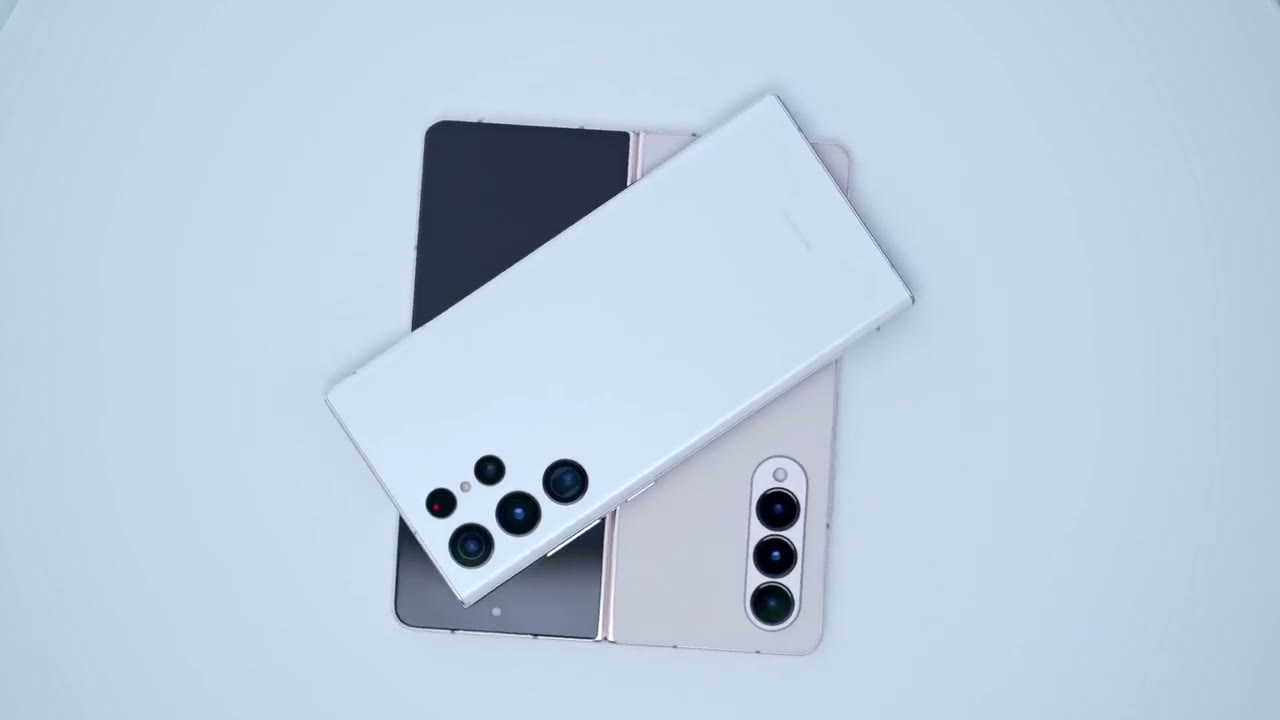
really happy with the performance of this now that i’ve used the z4 tested it in a bunch of things i’m still really happy with the s22 ultra and i would have no problems to keep on using this end considering the following that the s22 has that the z-fold four does not so the s22 ultra has an official dust rating where the fold four does not you also have a 230 millimeter lens so you can get you know very tight shots or you can zoom in a lot and you don’t have that option on here that lens is missing as well this is a thinner and lighter foam overall you know that might matter to you it is a larger battery at 5000 milliamp hours and you have the s pen built directly into the body so you don’t need to carry a special case to carry around the s-pen you know there’s no s-pen with this phone and to carry it you have to buy a case so you know overall i think the s22 ultra is still a really excellent phone and i wouldn’t rush to trade this in unless you really find yourself you know needing extra screen real estate or if you’re constantly splitting apps or jumping between apps you know in that case it may make a difference to you but overall it’s still an excellent phone overall and i’m sure you know you can definitely ride it out to the s3 to see if it’s worth the upgrade then so can i recommend the galaxy z4 and what i would say is that if this is the first foldable phone that you’re considering then this is probably a great time to take a look at samsung’s offerings you know i haven’t owned the previous ones but from what i’ve heard
Recommended?

um this is a pretty great improvement in a lot of areas especially the cameras now this feels completely polished it feels really premium in the hand it is just sturdy overall and this hinge is rated for you know about four to five years of life or 200 000 volts and most people are upgrading their phones within four to five years for sure so i don’t think it’s ever going to be a concern as long as you’re you know trading this in before that time now a phone like the s22 ultra has a really big screen already but if you find yourself you know kind of hoping for a little bit more on your s22 ultra or the ability to split apps and have a bit more screen real estate then you know this is probably a good option for you alright guys so i hope this review was helpful and just gave you a little bit more information about this phone and if it’s worth it for you and if it’s worth trading in your s22 ultra for this phone and if there’s anything i miss or anything you’re unsure of uh please leave it down in the comments down below i do my best to reply to everyone if you found this video helpful please consider liking and subscribing i’m going to be making a follow-up video with just some quick tips and settings to address on the phone to get the most out of it thanks and i’ll see you in the next one bye
☑️ Get the Galaxy Z Fold 4 on Amazon
Please note that some of the links in my video descriptions are affiliate links where I earn from qualifying purchases. As an Amazon Associate I earn from qualifying purchases.

