


Please note that some of the links in my video descriptions are affiliate links where I earn from qualifying purchases. As an Amazon Associate I earn from qualifying purchases.
Intro

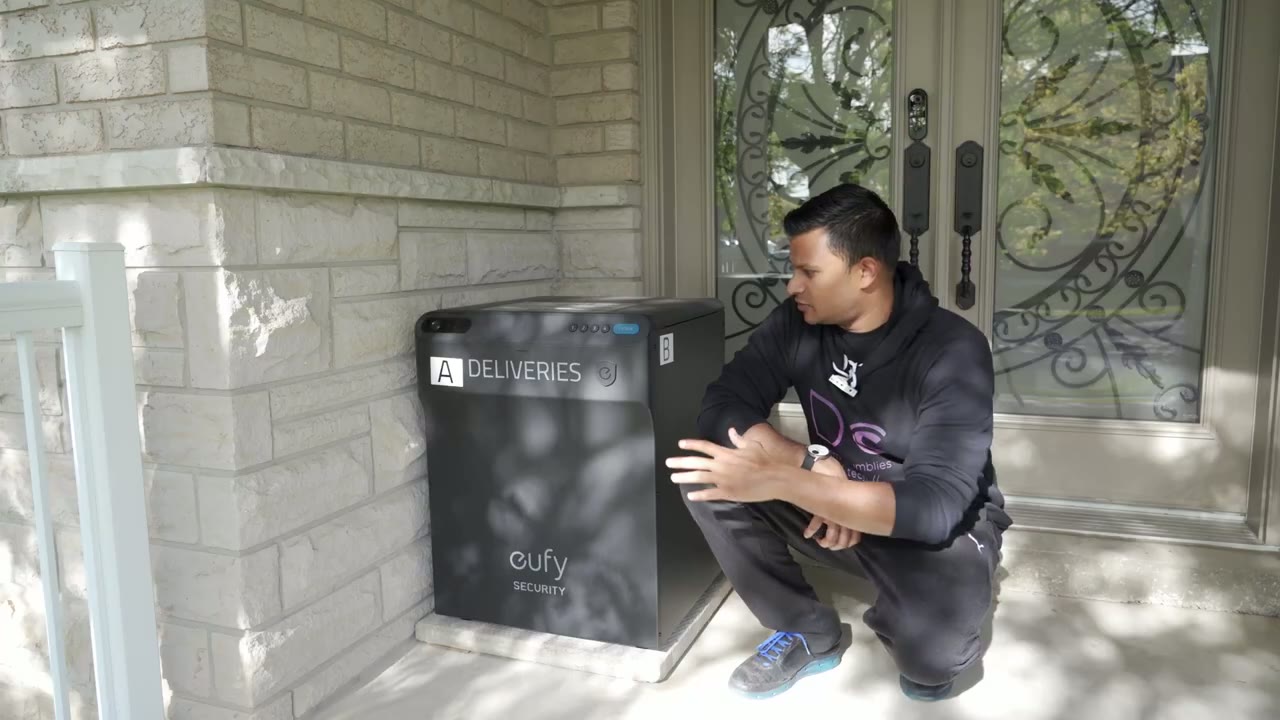
hey it’s Adrian today I’m taking a look at this UV smart drop and this is going to allow you to accept packages while you’re at home or while you’re not at home and then you can come back and safely retrieve them so you can see it’s a pretty big unit so I’m just going to test it out and see how well it performs and let you know my thoughts on it specs
Specs

included an all metal body with anti-corrosion coating there’s also ip65 weatherproof rating there’s a 10 000 milliamp hour battery a 1080p HD camera with motion sensors two-way audio all
Installation

right let’s get started with the install so this is a pretty sizable box comes in at around 44 pounds so you may or may not need help all right so the Box is open and you can see at the top we have an assembly guide with some detailed instructions on the flip side of that we also have a positioning guide if you want to drill this down no dents or damaged everything was really well packaged and separated first all the hardware to get everything set up so you can see that we have the ufe battery here charging cable for that we also have a key for the unit as well and then just the regular installation Hardware so you can see when you’re connecting the panels so see and a b so there’s three holes on the side where you’re gonna line up the screws for both the right and left panel with the right and left panel install the next step is to install this rear panel so you can see we’re going to line up the holes again on the rear side all right for this step so I flip the entire unit upside down see it like that and I’ve put the bottom portion so now all this stuff is to secure the bottom area alright the next step is to now add these L brackets one to this side and one to that side just for further stability the next step is to attach the lid and secure it on the right and left side the next step is to connect these pneumatic arms so you can see there’s a connection there and there and then here and here design
Design

wise you can see it’s a really nice looking unit so it’s sufficiently deep enough and tall enough to accommodate a decent amount of packages before you have to get to it and clear everything out there is a built-in camera so that you can have video alerts in the ufe app so you can see who’s coming and who’s going so first thing I’m going to do is
App Setup

I’m just going to open it up and insert the battery pack welcome to YouTube smart drop okay now that the smart drops completely assembled I’m going to add it to the yuffie app so I’ll just go into the app pair at the Smart drop add it to my home just gonna put in the password so I’ve put in my Wi-Fi password make sure you’re on a 2.4 gigahertz band now it says to open up the lid and press the sync button so let me do that now and you may not be able to see it but there is a sing button right here it’s a white button I’m going to press and hold it for two seconds Tire Ruby that’s the beep please close the lid when you leave thank you click next and what it’s saying is it’s going to generate a QR code for the Wi-Fi connection and I’m going to scan that code with the camera on the smart drop so that’s a code I’m just going to move the phone off camera to scan it and there we go connecting to the Wi-Fi network so the camera on the smart drop did scan the code I’m going to go ahead and click next and we’re gonna wait for it to connect setup was successful
Usage

all right so if you have no packages and your first delivery driver comes they can easily just hit open and pop their package in and then close it back [Music] the second delivery driver they’re not going to be able to do that because now there’s a package in there so you can see enter the pin code on the address label and press open enter the pin code on the address label and press open so you can see it prompts the second delivery driver to enter the pin code on the address label so whenever you order from Amazon or wherever in the special instructions or other or additional information just put you know box code whatever that’s what I’ve been doing and it’s been working really well for Amazon drivers there may be situations where you can’t actually put in any additional instructions on the shipping label and in those cases the driver is not going to know what’s going on or how to open this if they’re the second or third driver of the day because just pressing open is not going to work in those cases I can initiate a live view with the driver and open the lid remotely and just ask them to close it so here’s a demo of that to talk to a driver who doesn’t have a code on his package this is how I would do it so I’ll open up live view please place the package in the box and close the lid so you can hear that it clearly talks to the driver they can hear it and then on the app I can hit open they’ll put the package in and just close it and I’ve given them the instruction to close it when I talk to them when it comes to opening the box you have five options so you can open it with the button without a code with a code with a key with your phone or with a voice assistant and I’m going to demo the three ways that I’m going to be using it the most buy button foreign by PIN code or by key [Music] here’s a silly demo just to showcase the
Size & Capacity

size capacity on this thing you could actually fit a person in here
Delivery Experience

so in terms of my experience with delivery drivers actually using it I’ve only had about two deliveries so far but both times they used it there is a sticker at the top letting them know as well that this is a delivery box and I mean it’s plastered all the way on the front so it’s been working well so far ufe also provides a sticker that you could put on top of the box to show that it is a delivery box and I have the honor it has some simple instructions on there and has been working well the other thing that I would say is to keep in mind where you position this so you can see in this entire area here this is in the corner but as soon as someone comes up the stairs right away they could see this and on top of it it says it’s a delivery box so putting it somewhere visible and easy to access is really going to improve the chances of drivers actually using it it’s also great that you can add delivery pins for specific company so I can have one for Amazon Purolator DHL and that helps me know who opened it so if I’m away from home I didn’t get an alert you know based on the code that was entered you know I know who delivered the package that day I’m so glad they also included a camera on here it’s not something that you really need but having that is great because you can see who’s coming who’s going you can talk to them in real time and if someone tried to tamper with the Box obviously you’re going to capture that on video and then you can review that later please close the lid when you leave thank you so when I set this up I charge
Battery Life
a battery to 100 it’s been a little over a week since it’s been going and I’ve gotten a bunch of packages I’ve also played around with it heavily with all the settings testing it getting shots in and it’s at 87 right now part of the reason that it’s at 87 is because I’ve been playing with it heavily just to get it set up to get shots tested out and there are two modes on here a guard mode and a guard mode and delivery mode the delivery mode is just going to record the comings and goings of drivers however guard mode and delivery mode is going to record drivers plus whoever passes in front of the camera meaning anytime you exit the house if a salesperson comes to your porch or if they’re walking in front of the sidewalk where it is positioned it’s going to catch all of that and that’s my case so where this is positioned this camera it’s facing towards the sidewalk and there’s always people come in going so at 87 considering it’s capturing a lot of motion and I’ve been playing around with it it’s very respectable battery
App Settings

life all right let’s go through these settings for the smart drop so I can go into here click settings and you can see right now Auto method or auto switch is the open method and auto switch is preferred because if the box is empty the first person who hits open on it is just going to open without a code and they can put the package and close it once it’s closed the next person who makes a delivery is going to require a code so this is the best way to have it I’m going to leave it like that now you can see you also have options for motion detection and you have human activity or all motion and you can set the sensitivity I’m going to leave it on the default options right now or default settings now under power manager you can see there’s a delivery mode and a delivery in card mode so card mode if there’s any type of motion that the camera detects it’s going to be recording it delivery mode only records you know delivery motions and nothing else so but I’m going to leave it on delivery and guard mode I don’t mind charging the battery or recharging it every so often so I’ve already set a master pin if we go into video quality you can set it to Auto depending on the strength of your Wi-Fi or the bandwidth on your internet connection I’m going to leave mine on high just to see how well it handles it and what the impact is going to be like on battery life now audio settings I’m going to leave it at medium I don’t want to scare the delivery person when it starts talking so I’ll leave that there and everything else like motion activated prompts microphone that is all going to be turned on to look at the activity log since I have had a couple of deliveries so if I click into deliveries you can see that it shows the status of the lid as close so that’s good to know you know if a delivery driver left it open or not now you can see there’s a diary or a log here and this is what I’ve done today now if I keep going here you could see that I did open and close this and that was just me playing around there was another day here where I had another delivery driver here of course you can also do a live view so I could just go into the live view here and I can just press this you know talk to the driver and then manually open a box if they don’t have a code or if a code wasn’t printed on the label under delivery pin that is where you could add different couriers so I have Amazon later on UPS FedEx whenever I’m expecting a shipment but most of my deliveries are from Amazon alright so
Recommended

can I recommend the UV smart drop and for me personally this thing has been a huge relief having because anytime I’m out of the house and I know I have a package coming sometimes more than one I always have a bit of anxiety because I’m just worried they’re just going to leave it anywhere here there’s always people you know walking in front of this house because it’s kind of on a corner a lot and I’m always worried and I want to rush to get home now that I have this I don’t have to worry about that if you’re like me and you have a bit of package anxiety you’re worried about porch Pirates or it’s kind of a thing in your area getting this is definitely going to give you a lot of peace of mind I’ve had a couple of deliveries from Amazon already this week and every single driver has used this if you’re interested in picking up the UV smart drop I’m going to leave some links in the description down below and as always if you found this video helpful please consider liking and subscribing and I’ll see you in the next one Adrian out
Please note that some of the links in my video descriptions are affiliate links where I earn from qualifying purchases. As an Amazon Associate I earn from qualifying purchases.

